Master Passwords in Enpass
Your Master Password is used to encrypt all your data and to unlock the Enpass app, so it is important to create a strong but memorable password that you do not store anywhere that it could be discovered. For security purposes, it is not possible to recover your Master Password.
Create a Master Password
A strong password should include a combination of symbols, letters, and numbers, and should avoid using birthdays, names and other common or public information.
Read more about creating a strong Master Password
Change your Master Password
If you are syncing your Enpass data across multiple devices, be aware that any change to the Master Password will apply to all devices.
Read more about changing a Master Password
Master Password Reminders
To help you avoid forgetting your Master Password, Enpass periodically prompts you to re-enter it, especially when you unlock using biometrics. Since your Master Password is the only key to your encrypted data, these reminders help ensure you always remember it.
How It Works
Master Password reminders use a spaced repetition technique, which means:
-
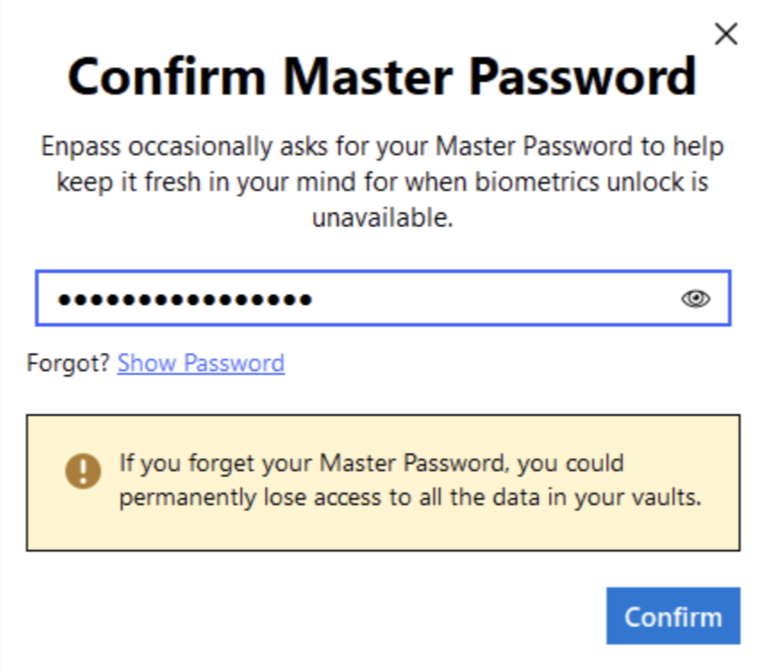
- Reminders start frequently and become less frequent over time as you successfully enter your password
- They appear only after biometric unlocks (not when you type your Master Password)
- You can skip a reminder temporarily, and it will appear again on your next app unlock
- Successfully entering your password advances you to the next interval stage
Autofill Reminders
During autofill, you can choose to enter your Master Password or skip. Reminders do not appear when creating passwords or passkeys.
Managing Reminders
For Individual Users (B2C):
You can control Master Password reminders in your settings:
- Go to Settings → Security → Quick unlock
-
Check this box in order to turn on or off
Master Password reminders.
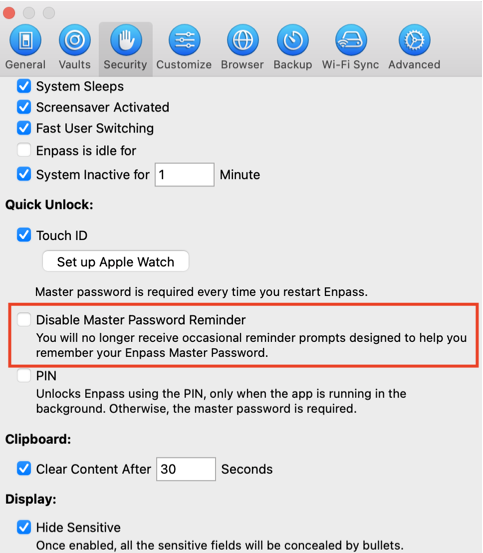
- If disabling, you'll need to enter your Master Password once to confirm
- This setting applies only to the current device